
A good user experience includes a good search experience, and the two cannot be separated. That used to be an argument we had to make. We no longer have to, because the numbers are in, and they are worse than most product teams assume. Content discovery is a search proble,
Baymard Institute's 2026 benchmark of ecommerce search, built on more than 170 sites and apps and over 10,000 performance ratings, finds that 56% of sites fail to adequately support users' search needs. Broken down by platform, 46% of desktop sites, 58% of mobile sites and 64% of apps have a search experience rated mediocre or worse. Only 44% rate decent or good. These are large retailers with budgets for search, not hobby sites. If the search box on your product is a text field wired to a keyword match, there is a good chance it is in the majority.
In this post we go through what the data says about how people search, five strategies that follow from it, and what we have learned about searching content that is not text. As usual, every number has a source, and the sources are at the end.
The Search Box Is Many Search Boxes
The most useful finding in the Baymard research is that people do not search one way. They type an exact product name, or a product type, or a feature, or a use case, or a symptom of the problem they want solved, or an abbreviation, or a compatibility question, or something that is not a product at all, like a return policy. Each of those is a different query type, and each fails on a different share of sites.
Exact searches, the easy case, have issues on 12% of sites. Product type searches, 20%. Symptom searches, where the user describes the problem rather than the product, 37%. Feature searches, 39%. Use case searches, 43%. Compatibility searches, 44%. Abbreviation and symbol searches, 54%. And 15% of sites do not support the most basic non-product queries at all, even though in Baymard's testing 34% of users tried to search for non-product content such as how to track or cancel an order.
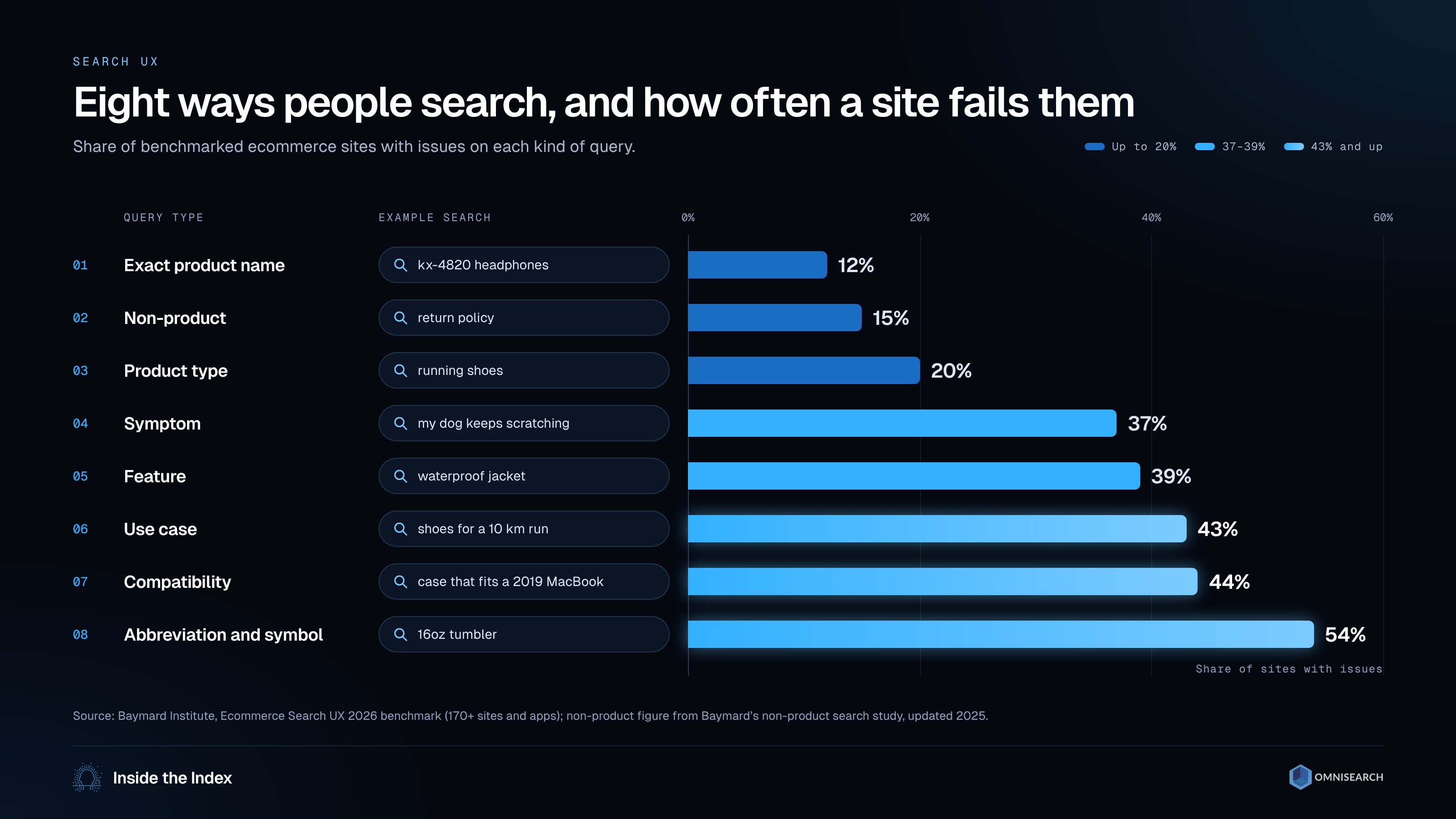
Eight ways people search, and the share of benchmarked sites with issues on each (Baymard Institute, 2026 benchmark)
The lesson is that content discovery is not one feature. It is a stack of capabilities, and a team that has only solved exact matching has solved the smallest part of the problem.
Strategy 1: Metadata Is a Layer, Not the Whole Answer
The standard advice is to tag your content with descriptive, keyword-rich metadata. It is good advice, with a correction: tags get you through exact and product type searches, which are the two query types with the lowest failure rates already. They do nothing for the user who types "my dog keeps scratching" or "fits a 2019 MacBook" or "returns".
What closes those gaps is structure plus understanding. Structured attributes (size, material, compatibility) make feature and compatibility searches answerable. A synonym and abbreviation layer catches "tee" and "t-shirt" and "16 oz" and "16oz". And indexing your non-product content, help pages, policies, account actions, means the search box can answer the questions people bring to it instead of returning nothing. Good tags are the foundation. They are not the building.
Strategy 2: People Already Search With Their Camera
Visual search stopped being a novelty while nobody was watching. Google reported in October 2024 that Lens handles nearly 20 billion visual searches every month, and that 20% of them are shopping related. That is the behaviour your users bring to your product: they have a screenshot, a photo, or a frame of a video, and they expect to search with it.
Inside your own content this takes two forms. The first is searching by image: a user uploads a picture and gets back the products, scenes or documents that look like it. The second is searching the words inside images, because screenshots, slides, scanned PDFs and video frames are full of text that a conventional index never sees. Optical character recognition turns that text into something searchable, and in our own benchmark, exact matching of the words on screen found the right screenshot first in 19 of 20 on-screen-text questions, where a sentence embedding of the same text managed 8. A screenshot of an error message should be findable by the error message, letter for letter.
Strategy 3: Audio and Video Are Searchable Only If You Transcribe Them
Every hour of video or audio in your library is unsearchable until it is turned into text. Omnisearch transcribes speech in more than 80 languages and indexes the result alongside the words on screen, chapters, speaker turns and the slides in a presentation, so that a lecture, a webinar or a product demo can be searched the way a document is, and the result is the timestamp where the thing was said, not the whole file.

A webinar searched the way a document is: speech, on-screen text and chapters each return a timestamp (illustrative recording and quotes)
The practical point is that transcription moves content from the "you have to watch it" pile to the "you can find it" pile. For an e-learning platform, a media archive or a company with years of recorded meetings, that pile is usually most of what they own.
Strategy 4: Treat the Search Log as Product Research
Your search log is the only place users tell you, in their own words, what they could not find. Three numbers are worth watching every week: the share of searches that return no results, the share of searches followed by an exit, and the queries users retype in a different form. Each one is a list of content you are missing, synonyms you have not added, or query types you do not support. The Baymard query taxonomy above is a good way to classify that list, because it tells you which capability is missing rather than only that something is.
Strategy 5: Let One Question Cross Modalities
The newest shift is that users ask questions that no single index can answer. "Show me where the presenter mentions pricing" needs the transcript. "Find the slide with the architecture diagram" needs the pixels and the on-screen text. "Which episode has the guest from the earlier clip" needs faces. Agentic search, the approach we have been writing about in our recent technical posts, takes a question, decides which indexes are worth consulting, checks that the answers agree, and returns the exact moments. On a 100-question benchmark we published, choosing the right index per question answered more questions at rank 1 than searching every index at once, at two thirds of the cost.
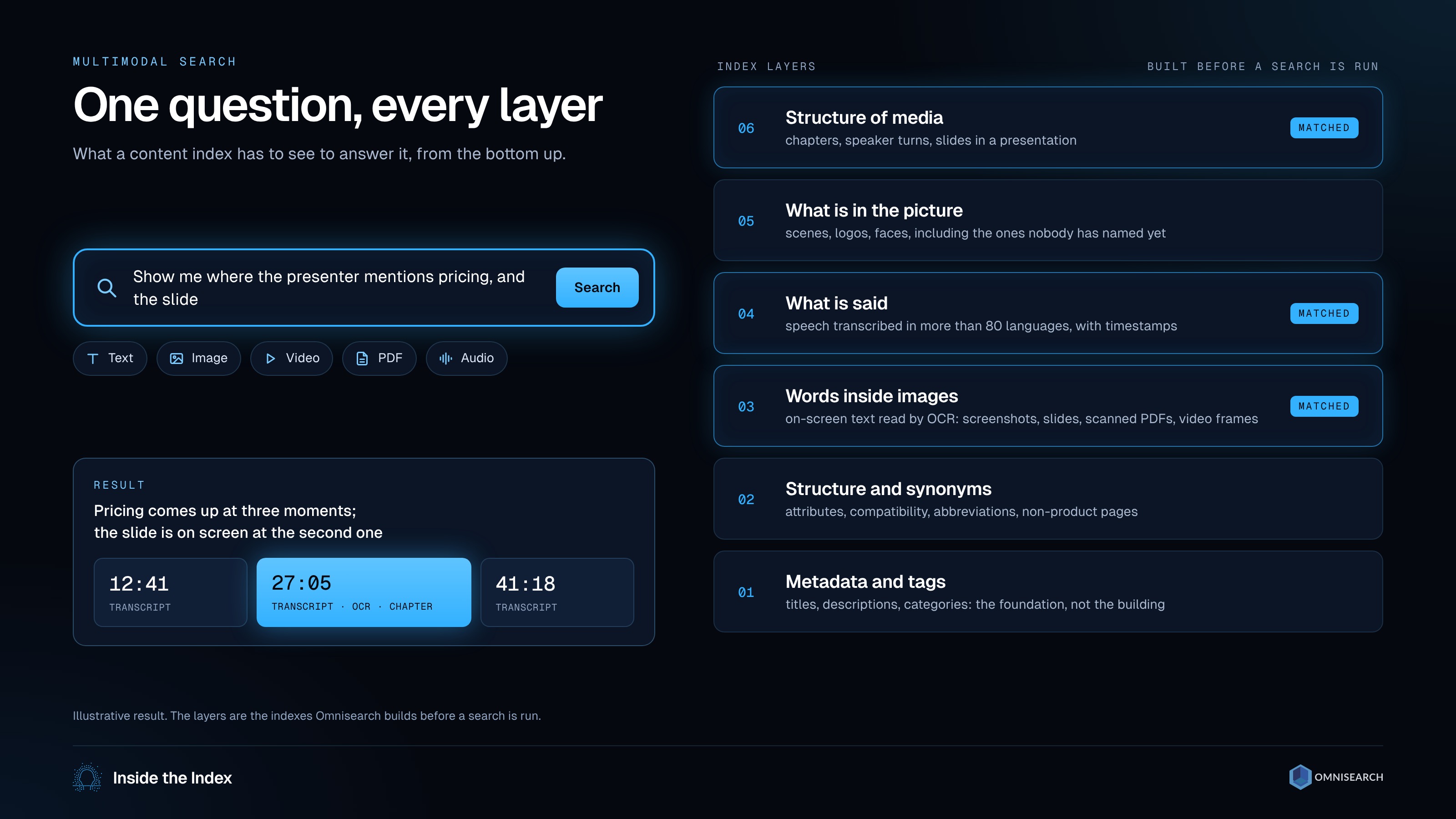
One question, every layer: the indexes consulted and the moments returned (illustrative result)
Where Search Goes Wrong
It is tempting to make this point with a list of famous sites whose search annoyed us. We will not, because anecdotes about sites that have since changed are not evidence, and the benchmark data says the same thing more fairly: most sites, including well-funded ones, fail on the harder query types, and the failures cluster where the user's words do not match the catalogue's words. Symptom, use case, abbreviation and non-product searches are where users give up, and they are also the ones a keyword index cannot fix on its own.
Why It Matters?
To summarize, content discovery is a search problem, and search is a stack: metadata for the exact queries, structure and synonyms for the hard ones, OCR for the words inside images, transcription for everything spoken, and a layer on top that can route a question to the right place. The benchmark numbers say most sites have built the bottom of that stack and stopped. Some of the most promising places to start include:
- Ecommerce and listing sites: classify a month of failed searches by query type and fix the type with the largest share, which is rarely exact matching.
- Learning platforms and media libraries: transcribe and index the video and audio you already own before producing more of it.
- Support and knowledge bases: make screenshots findable by the text inside them, and make non-product questions (returns, billing, account) answerable from the same search box.
We can no longer accept that a good user experience does not include a good search experience, and now we can measure how far apart the two usually are. We hope this gave you a clear overview of where site search fails and what to build first. If you liked it, share the article and subscribe to stay up to date.
About the Author
Tanya Bendis Sajn is the Director of Operations at Omnisearch, where she works on multimodal and agentic search over video, audio and documents. She writes the Omnisearch technical blog with Marin Smiljanić, where every post is built on an experiment you can rerun: recent ones measured a semantic diff for video, a re-indexing agent that knows when not to re-embed, and a 100-question multimodal benchmark for agentic search. Over the past 15 years she has focused on motion design for UX/UI; she was previously Head of Design at Amagi Eastern Europe, Lead Designer at the machine learning startup Brainome, and Lead Designer at the GIS big data company GDi.
Sources: Baymard Institute, Ecommerce Search UX 2026: query types and E-Commerce Search Needs to Support Users' Non-Product Search Queries; Google, New ways for marketers to reach customers with AI Overviews and Lens and Ask questions in new ways with AI in Search, both 3 October 2024.