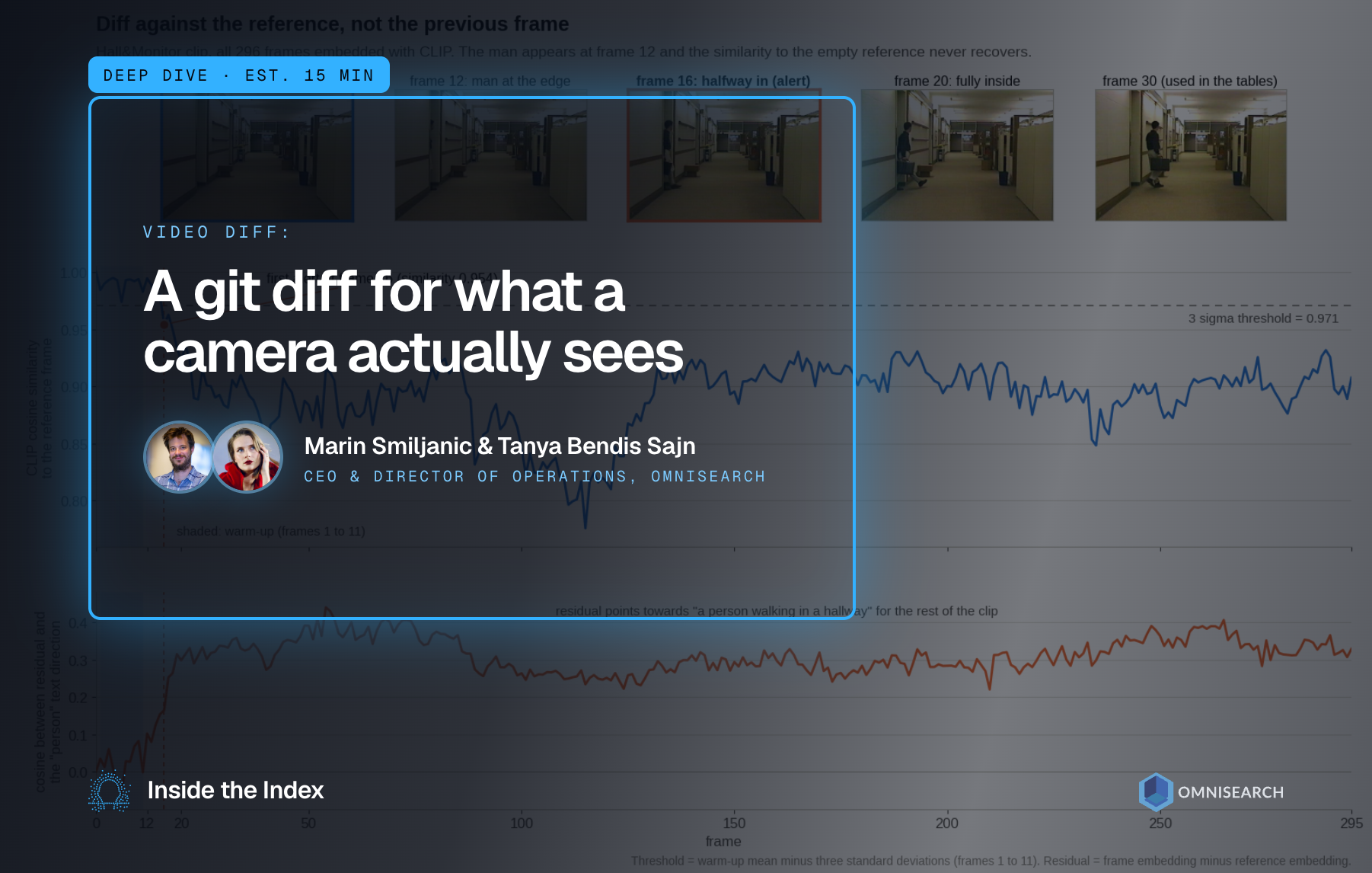

Remember git diff? Meet Video Diff, which knows when a scene really changed.
In a previous post we built Semantic Diff, a tool that compares two texts by meaning instead of characters. The natural next question was: can we do the same thing for video? Imagine a security camera watching a hallway. Overnight the lights dim, it starts raining, the stream gets compressed to a fraction of its bitrate, and the camera shakes a little in the wind. None of that matters. What matters is the moment a person walks in. The same problem shows up when you want to find scene changes in a movie, or detect that something moved in a simulation environment. In all of these cases we want a diff that answers one question: did the content of the scene change, or just its pixels?
If you compare frames the way git diff compares lines, by checking whether the values are identical, you get a tool that fires on every cloud and every compression artifact. So instead of comparing pixels, we compare meaning. Here is a high-level look at how it works.
- Pick keyframes from the video. These become the units we will compare.
- Encode each keyframe with a multimodal embedding model, a model which maps images and text into the same vector space.
- Compute the similarity between the current keyframe and a reference frame, and subtract the two vectors to get a residual that tells us what changed.
- Compare the similarity against a threshold to decide whether the scene changed, and if it did, make the current frame the new reference.
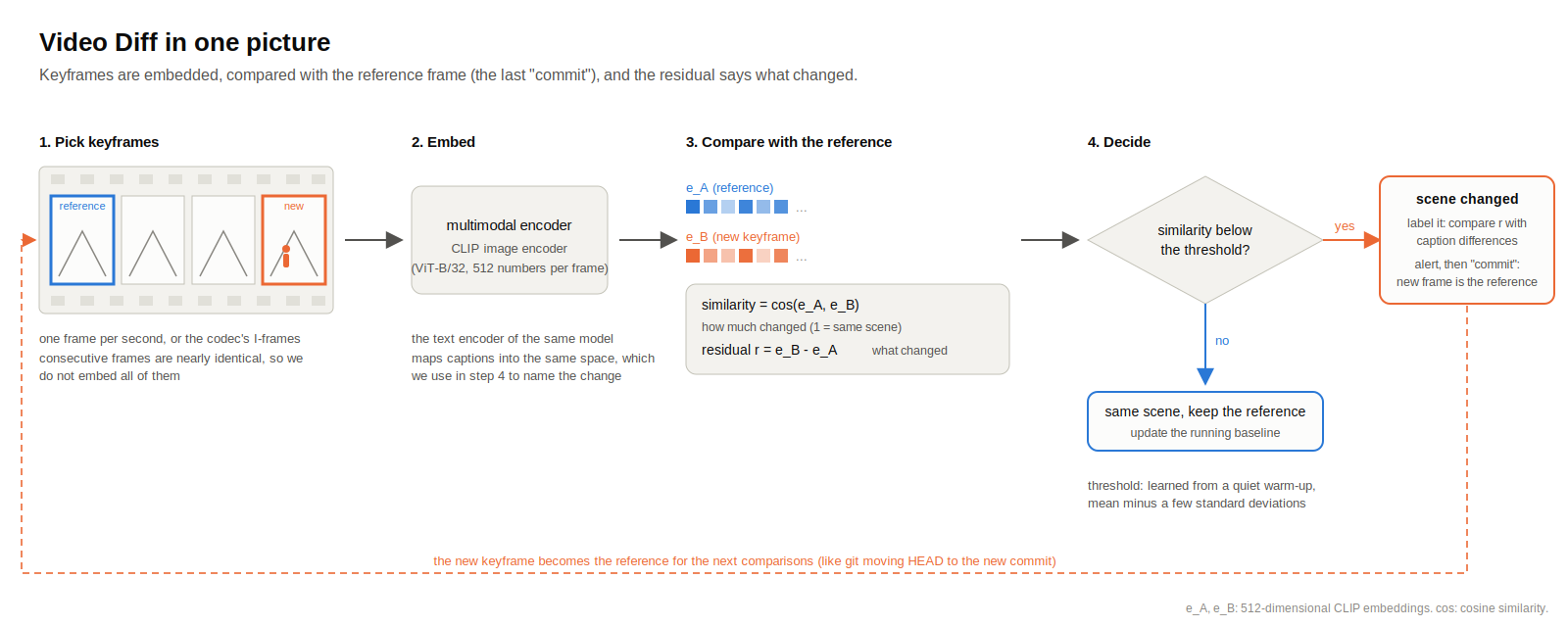
How Video Diff works, from keyframes to alerts
In the rest of this blog we will explain every step, and we will run everything on a real clip so you can see actual numbers instead of promises.
Why Pixels Are Not Enough
The simplest way to compare two frames is mean squared error (MSE): subtract the two images pixel by pixel, square the differences and average them. Zero means identical, and the bigger the number, the more the pixels differ. The problem is that MSE has no idea what a pixel means. Dimming every pixel by a bit produces a huge error, while a small person standing in a corner produces a small one.
Structural similarity (SSIM) was introduced by Wang, Bovik, Sheikh and Simoncelli in 2004 as a better match for human perception. Instead of raw differences, it compares luminance, contrast and structure inside small local windows and returns a value between -1 and 1, where 1 means the images are the same. It is a good measure of image quality, which is what it was designed for. But it still lives at the level of pixels, and it is known to be sensitive to small shifts and rotations, which is exactly what a camera in the wind produces.
Let's see this on a real example. We took the Hall&Monitor sequence, a well-known test clip of an office hallway (352 by 240 pixels) that is part of the SBI dataset. The first frame shows an empty hallway. Thirty frames later a man with a briefcase has walked in. We then took the empty frame and applied changes that a real camera sees every day, but that do not change what is in the scene: we dimmed the lights to 60%, recompressed the frame as JPEG at quality 20, added sensor noise, drew faint rain streaks over it, and shifted the whole image by a few pixels (4 to the right, 2 down). We also included the very next frame of the original video, which is still empty. Here is what MSE and SSIM say about each of them compared with the empty reference frame.
According to MSE, dimming the lights is almost ten times bigger a change than a person walking in, and the small camera shift is five times bigger. According to SSIM, the man walking in (0.823) is about the same as dimming the lights (0.825) or JPEG compression (0.844), and a much smaller change than sensor noise (0.604) or the camera shift (0.438). There is no threshold you could put on either column that would flag the person and ignore the rest.
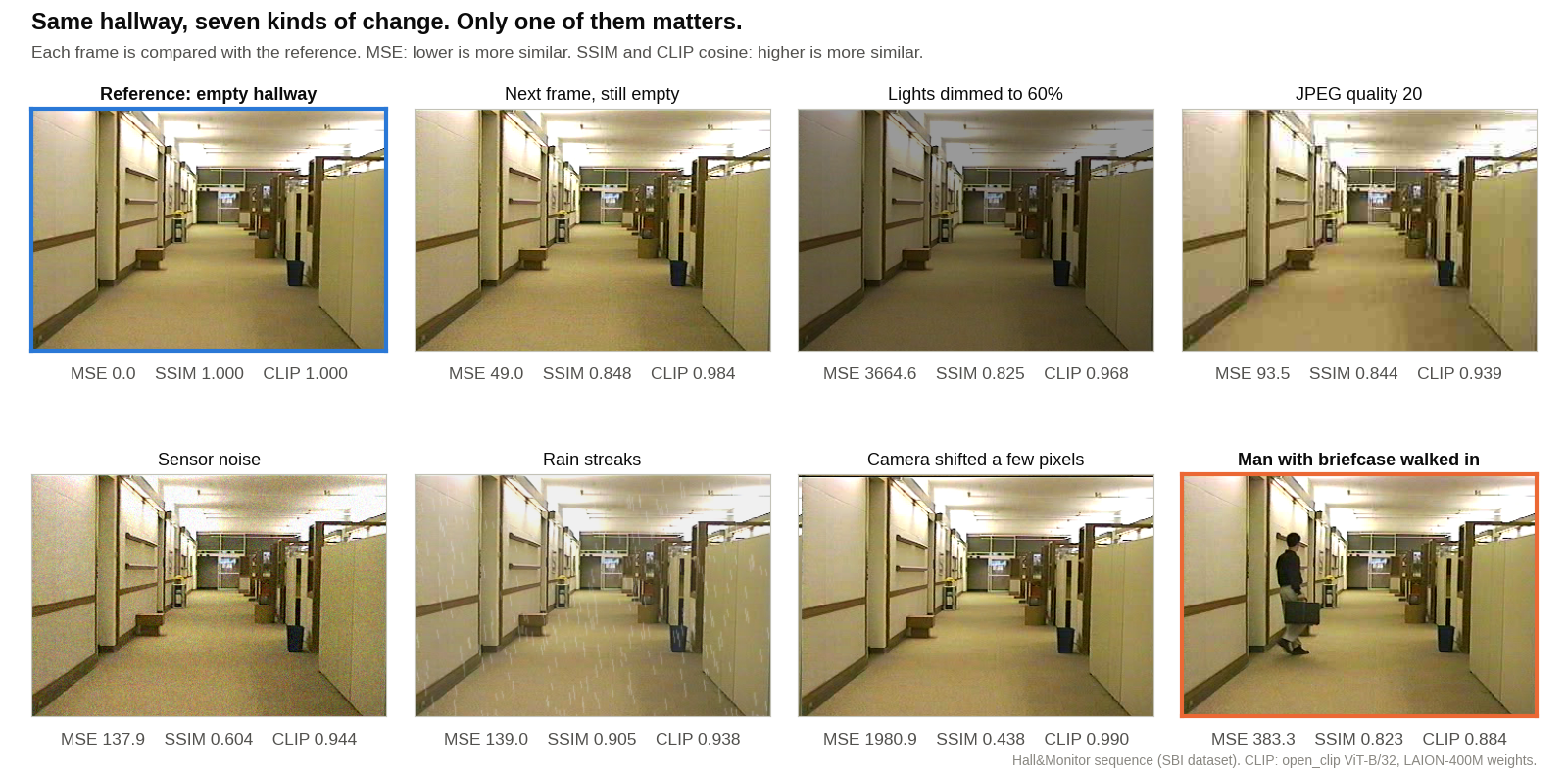
The same hallway under seven changes, scored by MSE, SSIM and CLIP
Picking Keyframes
A video is just a long sequence of images, usually 24 to 30 of them per second, and consecutive frames are nearly identical. Embedding every single one is wasteful, so we work with keyframes. The easiest way to pick them is to sample at a fixed rate, for example one frame per second. If you are decoding a compressed stream, you can also reuse what the codec already did: video codecs store some frames in full (the I-frames, which are self-contained images like a JPEG) and encode the frames in between as differences from their neighbours. Those I-frames are free keyframes.
Our clip is short, only 296 frames, so we simply embedded all of them. For a camera that runs all day you would sample.
Multimodal Embedding Models
Now we need a way to compare keyframes by what they show. In the Semantic Diff post we used a text embedding model that maps sentences with similar meaning to nearby vectors. For video we need the same thing for images, and ideally a model that understands images and text together, because we will want to describe changes in words later.
This is exactly what CLIP does. CLIP (Contrastive Language-Image Pre-training) was introduced by OpenAI in 2021 and trained on 400 million image-text pairs collected from the internet, with a simple task: given a batch of images and captions, predict which caption goes with which image. To do that it has two encoders, one for images and one for text, and both output vectors in the same space. A photo of an empty hallway lands closer to the sentence "an empty hallway" than to "a person walking in a hallway", and a photo with a person in it moves the other way. On our two frames the similarities were 0.299 vs. 0.265 for the empty hallway and 0.282 vs. 0.343 for the frame with the man. ImageBind from Meta (2023) pushes the same idea to six modalities, images, text, audio, depth, thermal and IMU data, so the same trick can be applied to other kinds of streams.
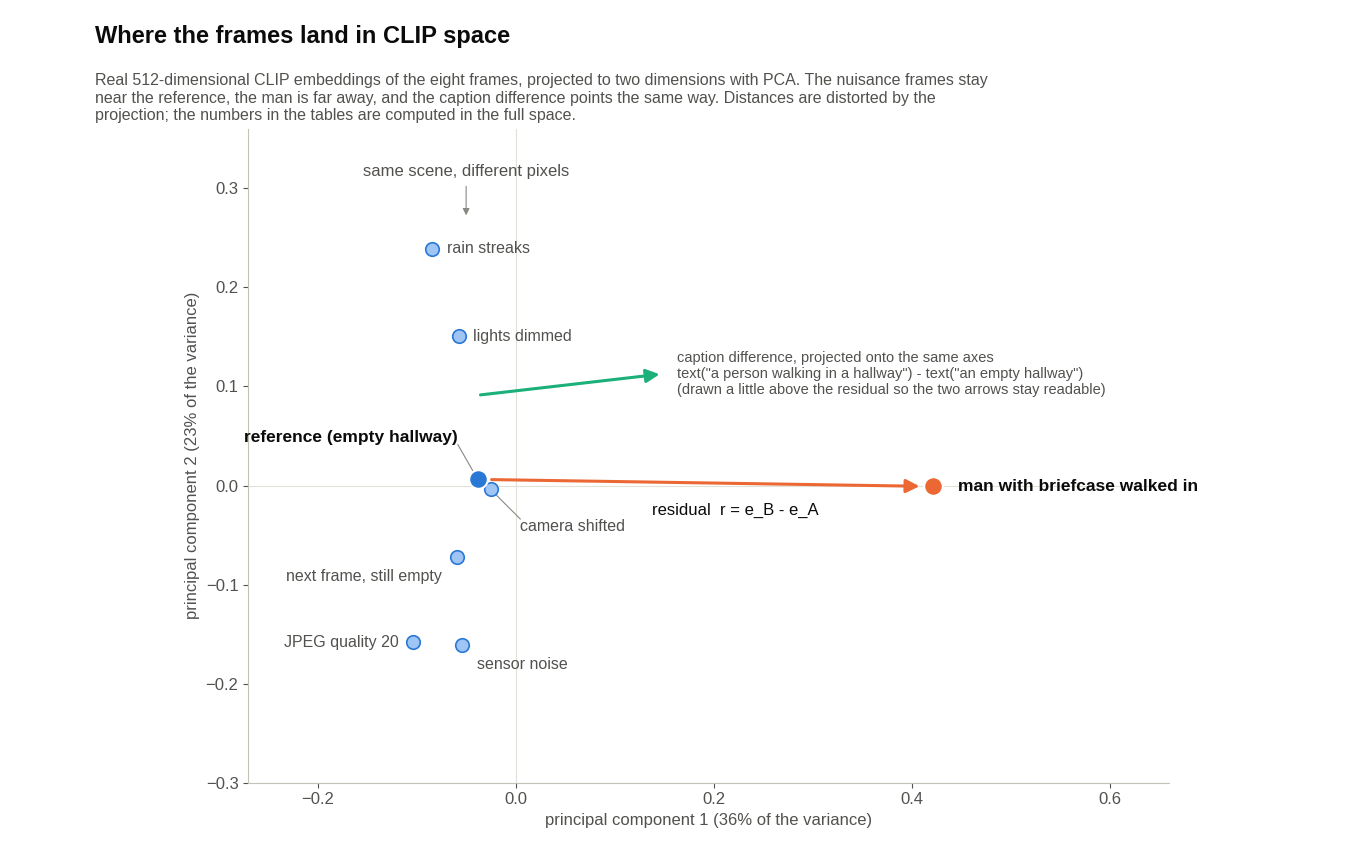
Where the frames land in CLIP space (a 2D projection of the real 512-dimensional embeddings)
For this post we used the ViT-B/32 CLIP model with weights trained on the open LAION-400M dataset, from the open_clip project. It maps every frame to a 512-dimensional vector. As in the text case, we compare vectors with cosine similarity:
cos(x, y) = (x · y) / (|x| |y|)
which is close to 1 when the two vectors point in the same direction. Here is the same experiment as before, this time with CLIP cosine similarity next to the pixel metrics.
The ordering flips. The camera shift, which was the worst offender for SSIM, is now a 0.990, practically identical to the reference. Every nuisance change stays above 0.93, and the only frame that drops below 0.9 is the one with the man in it. The embedding model does not care how the hallway is lit or compressed, it cares about what is in it.
One caveat. The model is not immune to everything. When we pushed JPEG compression to quality 5, which turns the frame into a mess of blocks, the similarity to the reference fell to 0.702, lower than the man walking in. Moderate degradation is fine, destroying the image is not. This is one of the reasons we do not stop at the similarity score.
The Residual: Isolating What Changed
A similarity score tells us how much changed, not what changed. For that we look at the residual, the difference between the two embedding vectors:
r = e_B - e_A
where e_A is the embedding of the reference frame and e_B is the embedding of the new frame. The idea that a difference of embeddings carries meaning is old. In 2013 Mikolov and colleagues showed that with word vectors "King - Man + Woman" lands very close to "Queen", because the male/female relationship is captured by a consistent vector offset. We are betting on the same thing happening in CLIP space: the offset between "empty hallway" and "hallway with a person" should look similar no matter which hallway you start from.
There is one trap. You might think we can compare the residual directly with the text embedding of "a person". That does not work well, and the reason is called the modality gap: in CLIP, image embeddings and text embeddings sit in two separate regions of the space, at arm's length from each other. In our run, the empty hallway frame had a cosine similarity of only 0.299 with the caption "an empty hallway", even though that is a perfect description of it. Raw image-to-text similarities are small and compressed together, so a residual compared with a single caption gives weak signals.
The fix is to compare a direction with a direction. This is the trick behind the directional CLIP loss from StyleGAN-NADA (Gal and colleagues, 2021): take the difference of two text embeddings, for example
t = text("a person walking in a hallway") - text("an empty hallway")
and measure the cosine similarity between the image residual r and the text direction t. Both differences are computed inside their own modality, so whatever offset separates the image region from the text region drops out, and what remains is the change itself. We did this for a few candidate changes, each described by a pair of captions: person (an empty hallway vs. a person walking in a hallway), dark (a bright hallway vs. a dark hallway), blurry, noisy and rain. Here is how well each frame's residual aligns with each text direction.
The residual of the frame with the man aligns with the person direction at 0.336. No other frame gets higher than 0.075 on that direction. The dimmed frame's residual points towards dark (0.153), the noisy frame's towards noisy (0.114), and the rainy frame's towards rain (0.178). Even the extreme JPEG frame, the one whose similarity score collapsed earlier, has a residual that does not point towards a person, so a person alert would not fire on it. The absolute numbers are small, which is normal for difference vectors in a 512-dimensional space, but the ranking is clear. And for comparison, when we compared the same residuals with plain caption embeddings instead of caption differences, the man's frame scored 0.161 on the person caption, less than half of the directional score.
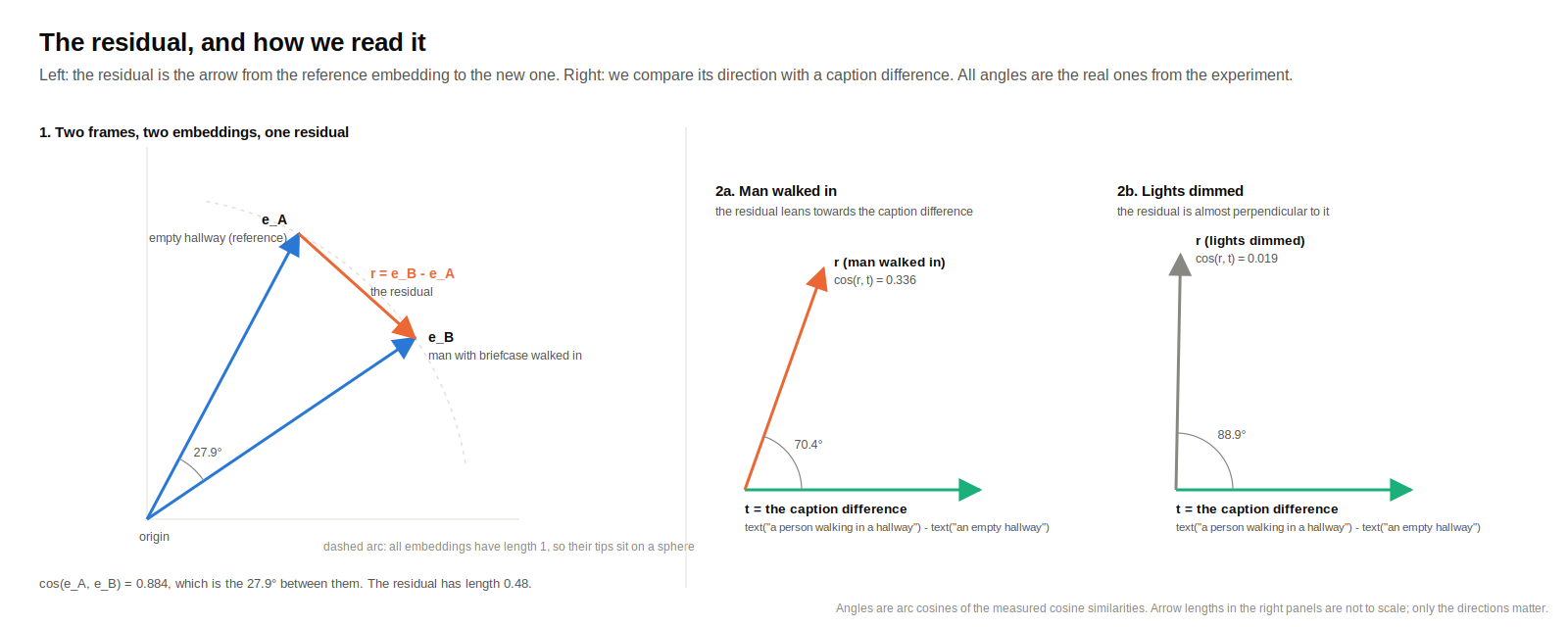
The residual, and how we compare it with a caption difference
Thresholds and Alerts
So far we compared single pairs. To turn this into a diff for a whole video we have to decide what to compare against. Our first instinct was to compare each keyframe with the previous one, the way you might compare consecutive commits. That misses slow changes. In our clip the man takes about eight frames to walk into view (he appears at the left edge at frame 12 and is fully inside by frame 20), and the similarity between consecutive frames never dropped below 0.966 while he was doing it. Across the entire 296 frames it never went below 0.956. Every step is tiny, so a frame-to-frame diff sees nothing.
The git way of thinking helps here. git diff does not compare your file with what it looked like a second ago, it compares it with the last commit. We do the same: we keep a reference frame, compare every new keyframe with it, and when the scene really changes we "commit" by making the new keyframe the reference. Here is what the similarity to the reference (the first, empty frame) looks like across the clip. In the first twelve frames, while the hallway is empty, the similarity never drops below 0.973. The man starts to appear at the left edge at frame 12, and over the next few frames the similarity slides down: 0.976 at frame 14, 0.954 at frame 16, 0.934 at frame 19, 0.922 at frame 20. From frame 20 to the end of the clip, with people in the hallway, it never rises above 0.936. The residual alignment with the person direction tells the same story: never above 0.083 while the hallway is empty, never below 0.22 once someone is in it.
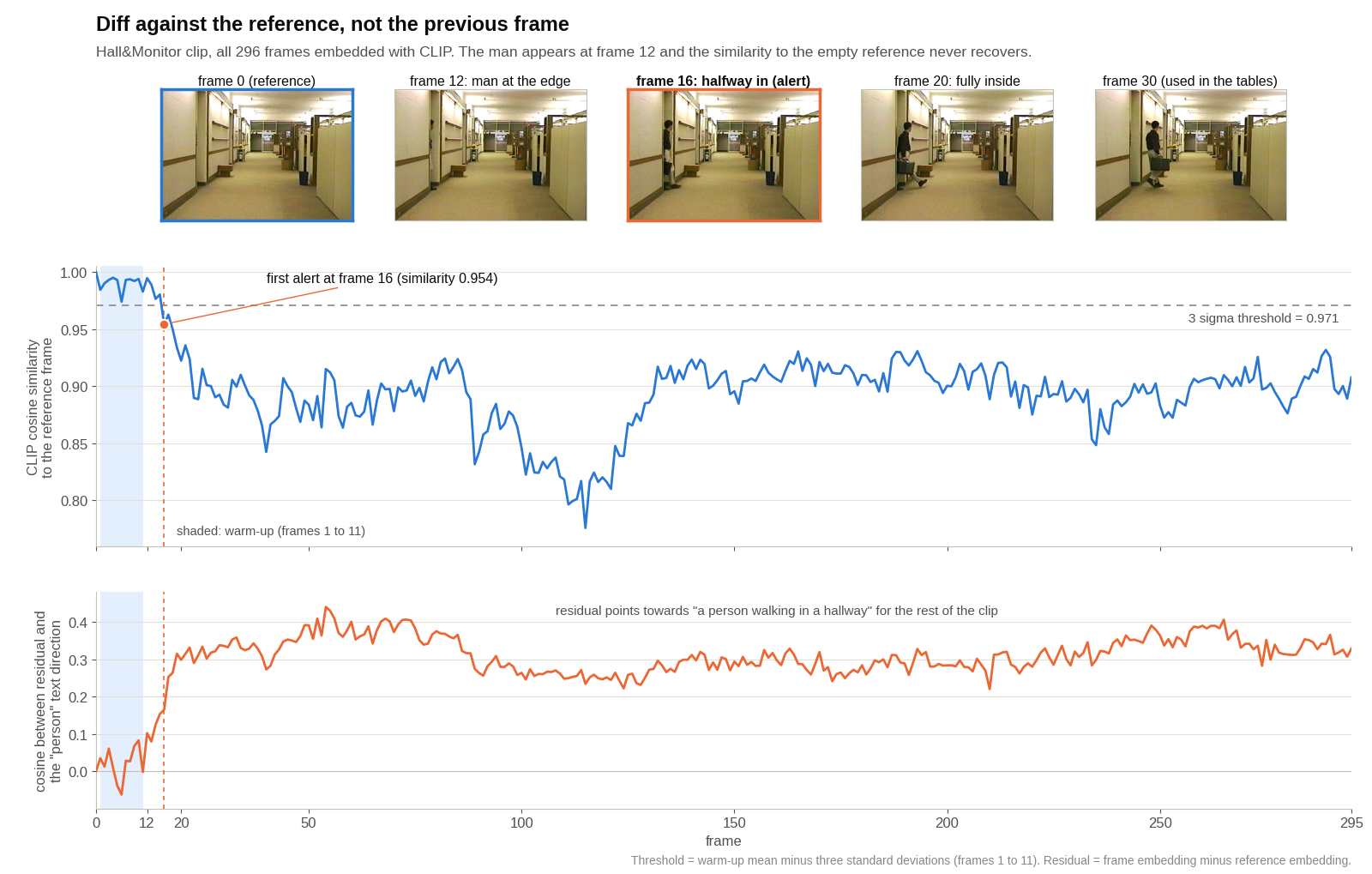
Video Diff run on the Hall&Monitor clip
Where should the threshold go? For this clip any value between 0.936 and 0.973 works, but a fixed number is fragile: a different camera, a different model or a night scene will have a different baseline. A simple way to make it dynamic is to learn the baseline from the stream itself. During a quiet warm-up period, record the similarity of each keyframe to the reference and compute its mean and standard deviation. Then alert when the similarity drops more than a few standard deviations below the mean. On our clip the eleven empty frames after the reference give a mean of 0.990 and a standard deviation of 0.006, so a three sigma threshold sits at 0.971, and the first alert fires at frame 16, when the man is halfway into the frame. After the alert, the residual is compared with the text directions to label what happened, the new frame becomes the reference, and the baseline is rebuilt from there. Slow drift, such as the sun setting over an hour, will eventually cross the threshold too, but its residual should point towards dark rather than person, as it did in our dimming test, so you can log it as a lighting commit, move the reference, and not wake anyone up.
We kept the implementation simple and there is plenty of room for refinement: better keyframe selection, a bigger model, averaging several captions per direction, or learning the directions from labeled examples instead of writing them by hand. We leave those for future work.
Why It Matters?
To summarize, a meaning-aware video diff opens the door to applications where pixel comparison keeps crying wolf. Some of the most promising use cases include:
- Smarter camera alerts: fire when a person or a vehicle appears, stay quiet when the weather changes, the lights flicker or the stream gets recompressed.
- Video indexing: split a long recording or a movie into scenes by semantic change, and label each change in words using the residual.
- Monitoring simulations and digital twins: detect when the state of an environment really changed instead of diffing rendered pixels.
We hope this gave you a clear overview of how to build a video diff and why comparing embeddings beats comparing pixels. If you liked it, share the article and subscribe to our blog: Inside the Index.