Semantic Diff

Goran Ivankovic
Software Engineer
Published:
April 15, 2026
Topic:
Deep Dive
Remember git diff? Meet its new friend Semantic Diff which understands what really changed.
Introduction
Anyone who has used git diff should be familiar with the pattern: red text for removed lines, green text for newly added ones. It’s a fantastic tool for tracking changes in your code. But what happens if you compare something other than code? If two texts share the same idea, expressed differently, or only a typo was fixed in one of them, they will still be marked as changed. This limitation gave us an idea: What if we built a diff tool that compares the meaning instead of characters? A tool that highlights which sentences are truly new, which ones disappeared, and which ones stayed the same, even if their wording changed. Using embedding models and some NLP magic, we can do that fairly easily. Here is a high-level look at how we achieved this at Omnisearch.
- Split both texts into sentences. These become the units we will compare.
- Encode each sentence using an embedding model - a model which converts texts into vectors that reflect meaning.
- Compute similarity between every pair of sentences across the two texts.
- Classify each sentence as added, removed or unchanged, depending on the calculated similarity.
In the rest of this blog we will explain how every bit of Semantic Diff works.
Splitting Text Into Sentences
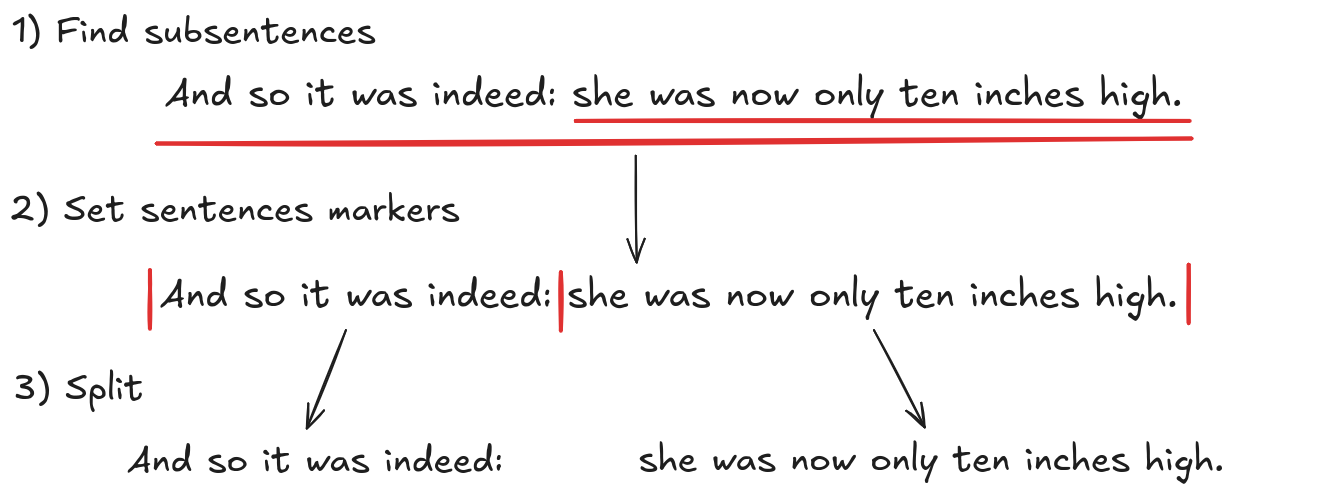
The first step in Semantic Diff is to split the texts into meaningful sentences. Unfortunately, this cannot be done by just splitting at the dots since some sentences may be complex and therefore very long, making the subsequent comparisons potentially incorrect. Ideally, each sentence should be some kind of a statement, more precisely, it should convey a single meaning. To achieve this, we used the spacy library along with the benepar model. This approach relies on constituency parsing to identify all subsentences in the text. The process works as follows:
- The model first assigns a POS tag (verb, noun, determiner, etc.) to each word.
- A set of rules then groups words together and labels them with categories such as Noun Phrase, Verb Phrase, or Sentence.
- This process repeats until the full structure of the text is built.
Any group of words labeled as a Sentence represents a unit that can stand on its own and is treated as a subsentence. As a result, subsentences appear both independently and as part of the full sentences. For Semantic Diff to work properly, we need non-overlapping sentences. To address this, we place sentence markers at the beginning and end of each detected Sentence group, then split the text at those markers. We also merge consecutive sentences that are too short, since very short segments would produce embeddings that are not meaningful or comparable. This yields us with sentences we will use for comparison. Let’s look at an example of how this algorithm works on a text which contains subsentences.
Embedding Models
Now that we have the text split into sentences we need a way to compare them semantically. Computers are very good at comparing exact symbols or numbers, but meaning is not exact. Words car and automobile share the meaning but not the characters. Entire sentences can express the same idea using a completely different wording. Embedding models solve this by converting text into numbers in a way that preserves meaning and is comparable by computers. To put it more precisely, an embedding model maps a piece of text, such as a word, a sentence, or a document, into a fixed-length vector, called a text embedding, in a high-dimensional vector space. In this space, vectors representing texts with similar meaning will be closer together, while unrelated texts will have more distanced vectors. This way machines can capture meaning.
For Semantic Diff, we used the model paraphrase-MiniLM-L6-v2. Hugging face offers a good search for open source models if you want to use a more specific one. Although the dimensionality prevents exact visualization, we can show a simplified version of an embedding model in only two dimensions.
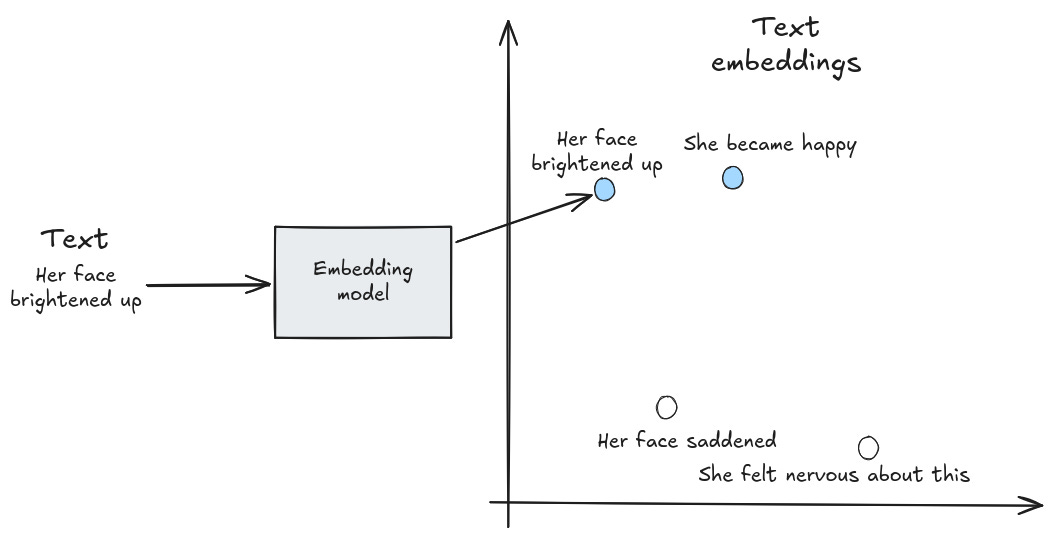
Because text embeddings are numeric vectors, not words, similarity can be measured using geometric operations, available to computers. The most commonly used method is cosine similarity, which is defined by the following formula:

Cosine similarity gets close to 1 when two vectors are almost aligned, which usually means the underlying texts are highly similar.
Let’s walk through a quick example to see how this works in practice.
Example:
The model produced two vectors, x and y for two starting texts with the following values:

Now we compute their similarity:

Since the similarity is close to 1, the meanings of the texts should be similar.
Now we need a way to classify sentences as changed or unchanged. First, we compute embeddings for all sentences in both texts and compare each sentence from the first text with every sentence from the second text. For each pair, we calculate a similarity score. Sentences are considered similar if the score is above a chosen threshold, and different if it falls below it. To determine which sentences changed, we check each sentence in the first text to see if it has a similar sentence in the second text. If a similar sentence is found, it is marked as unchanged. Otherwise, it is marked as changed. We then repeat the same process for sentences in the second text. In the next example, we start with two texts, where the second is a slight alteration of the first one.
Original text:
And so it was indeed: she was now only ten inches high. Her face brightened up because she thought that she was now the right size for going through the little door into that lovely garden.
Modified text:
And so it was really like that: she was now only 10 inches high. Her face saddened because she thought that she was now the right size for going through the big door into that terrible house.
The following table shows the similarity scores between sentences from the two texts. Unchanged sentences are underlined in yellow, while changed sentences are marked in blue.
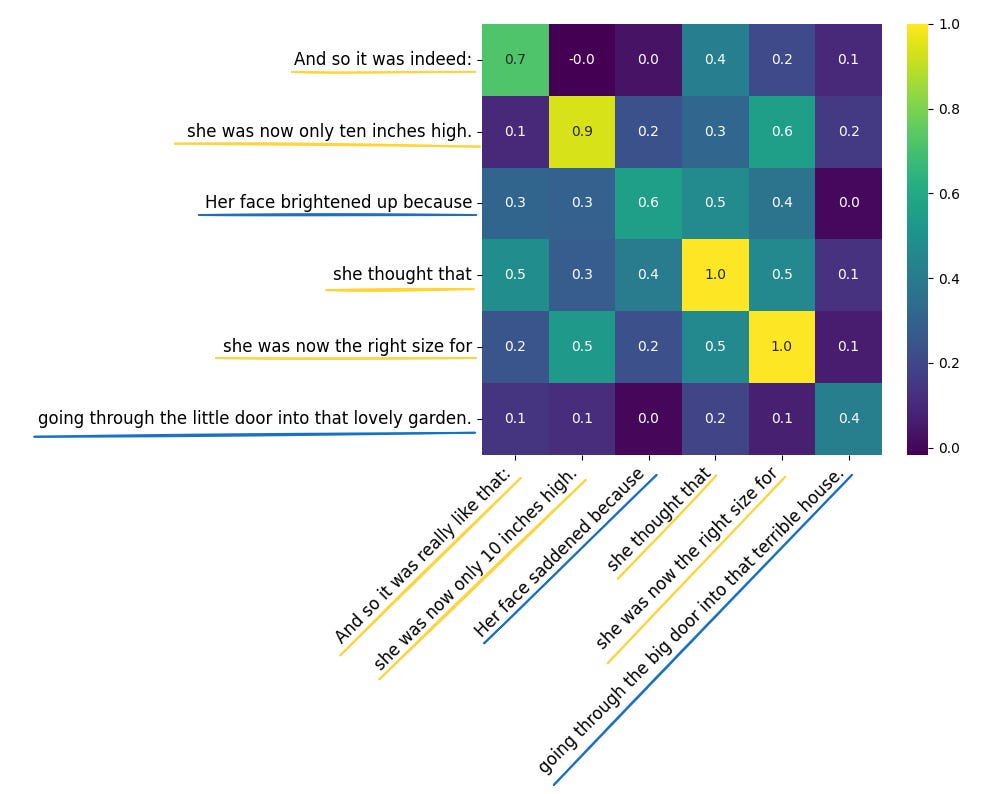
For example, And so it was indeed matches with And so it was really like that with a similarity score of 0.7. Since the threshold is set to 0.7, this pair is marked as unchanged. To make the output look more like git diff, we color the changed sentences in the first text with red (removed sentences), and changed sentences in the second text as green (added sentences). Unchanged sentences we keep uncolored. The final result looks like this:
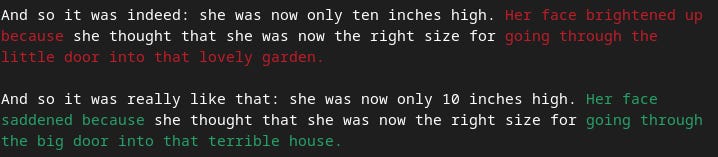
Here we only showed the case where both texts have the same number of sentences, but Semantic Diff will work with any number of them. It does this by matching any pair of sentences that have a high similarity score. In some situations, however, this might not make sense. For example, you might not want a sentence from the end of one text to match with a sentence from the beginning of another. In our use case this was not an issue, so we kept the implementation simple and we leave the further refinements for future work. The full code for Semantic Diff is available on our github, check it out!
Why It Matters?
To summarize, a meaning-aware diff opens the door to applications that traditional diff tools simply can’t handle. Some of the most promising use cases include:
- AI Model Evaluation: compare two model outputs and instantly see which sentences have appeared or disappeared.
- Version documents semantically: treat small rephrases as minor changes and changes in meaning as major ones.
- Detect plagiarism even when the text is paraphrased by focusing on copied meaning instead of matching words.
We hope this gave you a clear overview of Semantic Diff and how it works. If you liked it, share the article and subscribe on my Substack!